Choosing the Right Art and Design Icons for Your Creative Workflow
Every designer, developer, and content creator reaches a point where stock imagery or custom illustration simply cannot convey a concept as efficiently as a well-crafted icon. The search for a dependable icon set often leads through countless marketplaces, free repositories, and premium collections. Among the options that consistently appear in professional toolkits is a comprehensive bundle known as Art and Design Icons. This collection positions itself as a versatile, multi-format resource tailored for user interfaces, editorial layouts, branding collateral, and beyond. Understanding what this set actually offers, where it excels, and where you might consider alternatives is essential before committing it to your asset library.
What Defines the Art and Design Icons Collection
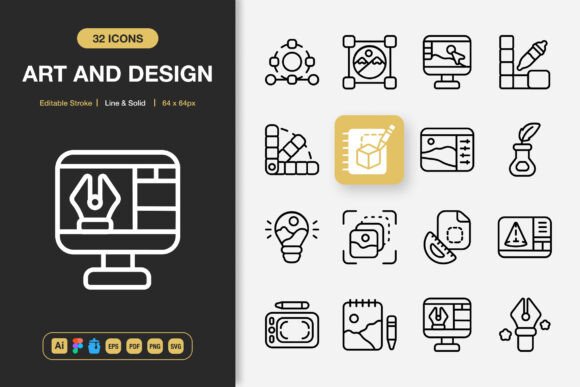
At its core, the Art and Design Icons package is a curated library of vector-based symbols built around creative disciplines. The subject matter spans traditional tools like pencils, brushes, and palettes, alongside digital-era symbols representing UI elements, wireframing devices, and multimedia production. What distinguishes this particular bundle from basic icon packs is its dual-style approach. Every icon arrives in both a clean line variant and a solid fill style, offering immediate flexibility without requiring separate downloads or purchases.
The technical foundation matters here. The source files originate in Adobe Illustrator, which means anchor points, stroke widths, and path structures remain accessible for deep customization. The inclusion of a Figma file acknowledges the growing shift toward browser-based collaborative design, while the Iconjar file streamlines organization for Mac users who manage large symbol libraries. Export-ready formats cover the spectrum most projects demand: EPS for legacy print workflows, SVG for web and responsive environments, PDF for cross-platform sharing, and a generous range of PNG sizes from 32 pixels up to 512 pixels with true transparency.
Reasons Design Teams Consider This Icon Set
Time efficiency consistently ranks as the primary motivator behind purchasing pre-made icon packs. Crafting a cohesive set of 50, 100, or more icons from scratch consumes hours that many teams cannot spare, particularly under tight deadlines. The Art and Design Icons collection addresses this by delivering ready-to-deploy assets that maintain visual consistency out of the box. The uniform stroke weight, matching corner radii, and proportional scaling across the entire set mean you avoid the jarring experience of mixing icons from disparate sources.
Another practical attraction lies in the editable stroke feature. In many icon bundles, converting a line icon to a heavier weight or adjusting the cap style requires tedious pathfinder operations. Here, the stroke remains live and modifiable in the source files. This small detail significantly reduces friction when adapting icons to match a brand's specific visual language. A marketing team can subtly thicken lines for a bolder social media presence, while a product designer can thin them for a delicate mobile interface, all without redrawing anything.
The breadth of compatible output formats also removes a common pain point. A single purchase grants access to vector masters for high-resolution print, optimized SVGs for web performance, and pre-rendered PNGs for quick placement in presentations or mockups. This eliminates the need for batch exporting or format conversion scripts, which often introduce unexpected artifacts.
Evaluating the Tradeoffs and Practical Limitations
No icon library serves every possible scenario perfectly. One consideration with the Art and Design Icons collection centers on its thematic focus. The aesthetic leans heavily toward creative industry and design tool metaphors. If your project requires icons for finance, healthcare, logistics, or other specialized sectors, this set may only partially cover your needs. You might find excellent symbols for the creative aspects of your application but still need to source supplementary icons elsewhere for domain-specific functions.
The dual line and solid style, while versatile, also presents a decision point. Some design systems demand filled, outlined, and duotone variants from a single icon family. This collection covers two of those three common styles. Projects requiring a duotone treatment will need additional editing or alternative resources. The customization promise holds true, but duotone creation involves more than adjusting stroke attributes, it requires deliberate color mapping and path separation that takes time to execute properly across an entire set.
File organization is another area worth examining. With substantial format variety comes the responsibility of managing multiple folders and versions. The included Readme file presumably offers guidance, but teams without a dedicated asset manager may find themselves navigating a complex directory structure. Integration into a design system demands a clear plan for which formats serve which contexts, otherwise the convenience of abundance becomes a minor administrative burden.
Situations Where This Icon Pack Excels
Certain project profiles align particularly well with the strengths of this collection. Portfolio websites for design agencies, freelance illustrators, or creative studios benefit from iconography that visually reinforces their professional identity. Using design-themed icons throughout a site creates a cohesive narrative that stock corporate symbols simply cannot match. The editable nature of the source files also allows agencies to recolor elements to match their brand palette precisely, an important detail when every pixel on a portfolio page must feel intentional.
Mobile applications focused on creativity, note-taking, sketching, or project management represent another strong fit. The line style works well for navigation bars and toolbar actions, while the solid variants can denote active states or highlighted features. Because the PNG exports include multiple resolutions, developers can implement crisp icons across varying screen densities without manual resizing. The SVG availability further supports teams adopting vector drawables for Android or PDF vectors for iOS, keeping the asset pipeline straightforward.
Educational and instructional materials also benefit meaningfully. Online course platforms, tutorial websites, and digital textbooks frequently need icons to break up text and signal different content types. Design-related subject matter, whether teaching software skills or artistic techniques, finds a natural visual companion in this icon set. The consistent style across dozens of symbols prevents the visual clutter that arises when instructors pull icons from unrelated free sources.
When Alternatives May Deserve a Closer Look
If your primary project is a corporate dashboard, an enterprise resource planning interface, or a medical records system, the theming of the Art and Design Icons collection may feel misaligned. While many icons depicting general actions like arrows, toggles, and menus exist within the set, the overall visual vocabulary skews toward creative tools. A more generalized icon framework, perhaps one specifically built for complex data interfaces, could provide broader coverage with fewer stylistic compromises.
Budget-conscious solo developers or hobbyists working on open-source projects might also weigh the cost against widely available free alternatives. Numerous open-source icon libraries offer extensive collections at no charge, often with community-maintained Figma plugins and framework-specific integrations. The tradeoff typically involves reduced style variety, less polished source files, or gaps in the more niche design-themed icons. If your project can achieve its communication goals with standard metaphors and you have time to curate from free sources, that path remains viable.
Large organizations with mature design systems should evaluate licensing terms carefully. The inclusion of editable source files is valuable, but understanding redistribution rights, embed permissions, and usage across unlimited client projects matters for agencies. A single license covering commercial work often proves cost-effective compared to royalty-free per-asset marketplaces, but verifying these details before purchase prevents downstream complications.
Making a Confident Decision Based on Your Workflow
Begin by auditing your current and upcoming projects for icon requirements. Map out the specific metaphors and actions that need visual representation. If a significant portion overlaps with creative tools, design processes, and artistic concepts, the thematic strength of the Art and Design Icons collection becomes a genuine asset rather than a limitation. The time saved by not illustrating core design-related icons from scratch can be redirected toward more strategic work.
Next, assess your team's technical environment. Designers working primarily in Illustrator will appreciate the native source files with editable strokes. Teams embedded in Figma gain immediate access through the included Figma file, reducing import friction. Developers receiving clean SVG exports with consistent viewBox attributes and proper stroke-to-fill conversions encounter fewer implementation bugs. If these format requirements match your stack, the technical alignment supports a smooth integration.
Consider the longevity of your investment. An icon set with editable source files grants you independence. As brand guidelines evolve, you can adjust stroke weights, recolor entire families, or modify individual icons to better suit new directions. This adaptability extends the useful life of the purchase beyond any single project. Compare this against static, non-editable alternatives that may force a complete replacement when visual requirements change.
Finally, evaluate the learning curve. The promise of easy drag and drop functionality lowers the barrier for team members who are not icon specialists. Marketing managers assembling flyers, social media coordinators designing posts, and content editors laying out infographics can all access pre-sized PNGs without needing vector editing skills. Meanwhile, experienced designers retain full access to the Illustrator and Figma sources for deeper customization. This tiered usability accommodates varied skill levels within a single organization.
Selecting an icon library represents a practical intersection of aesthetic judgment, technical requirements, and workflow realities. The Art and Design Icons set offers a thoughtfully assembled, professionally structured option for creatives who want their interface elements to reflect the same design sensibility they apply to their core work. By weighing the thematic focus, format coverage, and customization depth against your specific project demands, you can determine whether this collection earns a permanent place in your creative toolkit.