Cooked Chicken Vector Graphics: AI & EPS Collection
Most creative projects stall not because of a lack of skill, but because finding reliable, well-structured assets takes hours. This particular cooked chicken illustration set solves that problem directly. It’s a carefully built collection of vector graphics, delivered in formats that actually work the way designers expect them to. Whether you’re mocking up a restaurant menu, building an infographic, or creating app icons, the files behave predictably, and that consistency saves real time on deadlines.
What’s Inside the Cooked Chicken Illustration Set
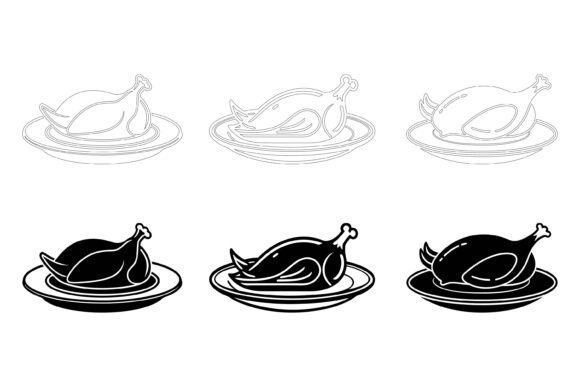
You receive three core file types with every download: native AI (Adobe Illustrator), universal EPS, and a high-resolution JPG preview. This isn’t a random bundle; the files follow a sensible naming convention and a clean layer structure. That becomes valuable when you need to isolate a drumstick from a whole roasted chicken or quickly change the golden brown hue to a grilled char without affecting shadows.
The cooked chicken designs themselves strike a balance between realism and icon clarity. You’ll find whole birds, sliced breast pieces, drumsticks, wings, and even plated servings. Each element was drawn with careful attention to silhouette and recognizable detail—crispy skin texture, bone ends, garnish—so the graphic reads well at both tiny app icon sizes and large print banners.
Why a Proper File Structure Matters
Anyone who has opened a stock vector and found hundreds of ungrouped paths knows the frustration. This collection explicitly avoids that mess. The layer stack is immediately understandable: base shapes, highlights, shadows, and optional details are separated and labeled. That means you can grab a single cooked chicken wing, duplicate it, scale it, and place it into a social media graphic without five minutes of ungrouping gymnastics.
- AI and EPS: Fully scalable, no resolution loss. Edit strokes, fills, and gradients directly.
- JPG preview: Quick reference or placeholder in presentations, wireframes, and emails.
- Mac and Windows ready: Files are saved in versions that open cleanly in Illustrator CC down to CS6 and comparable vector apps on both platforms.
- Organized object hierarchy: Every element sits inside a named group or layer, making version control straightforward.
Restaurant Menu Design and Food Branding
A well-designed menu card doesn’t need photography for every dish. Vector illustrations can unify the visual language, and a consistent cooked chicken graphic set helps maintain that cohesion. Use the whole roasted chicken as a section header icon, a fried drumstick next to combo descriptions, or sliced pieces in a nutrition panel. Because you can recolor the vectors instantly, adapting them to your brand’s palette—whether it’s a BBQ joint’s warm oranges or a bistro’s muted creams—takes only a few clicks.
Infographics and Nutrition Content
Nutritionists, food bloggers, and publishers often need visual cues that don’t distract from data. Placing a simple cooked chicken breast icon next to protein statistics, or a segmented chicken chart comparing cuts, makes complex information scannable. The clean linework and crisp details help avoid the clip-art look that cheapens credibility. Editors can also pull out individual bones, skin elements, or garnish to create entirely new compositions that still feel part of the same family.
App and Web UI Elements
From meal planning apps to grocery delivery platforms, food icons appear everywhere. The set’s symbolic approach—removing unnecessary realistic texture while keeping the shape unmistakable—sits well in modern UI design. Use a tiny roasted cooked chicken as a category icon for “prepared meals,” or a stacked set of wings for a rewards badge. The vectors export perfectly to SVG, and the organized layers make it simple to remove fills and create line-art versions for inactive states or dark mode interfaces.
Print Collateral and Large-Format Displays
Print requires resolution-independent artwork, which these AI and EPS files handle natively. Whether you’re printing a small loyalty card or a window decal three feet wide, the cooked chicken illustration stays crisp. The detailed consistency means you can blow up a single drumstick to poster size, and the bone texture and skin highlights will hold up without pixelation or awkward blurring.
Real-World Use Cases and Observations
One freelance menu designer used this set to rebrand a regional chicken chain. They replaced tired photographs with stylized vector roosters and plated cooked chicken images across 14 menu boards. The layer structure allowed them to quickly isolate and recolor the chicken to match each sauce flavor—red for spicy, yellow for lemon, brown for BBQ—without redrawing a single element. The result was a cohesive visual system that the client could later update in-house using free vector editors.
A marketing team for a meal kit service found the file organization especially helpful. They embedded the JPG previews into a Canva template library for social media managers, while the design team used the AI files for packaging mockups. The extracted cooked chicken parts (individual wings, thighs, breast slices) were combined with vegetables and grains to create custom composition photos that felt authentic to their brand without the cost of ongoing food photography.
In education, a nutrition instructor built an interactive module where students drag and drop different cooked chicken cuts onto a plate graphic based on portion size and calorie goals. Because the vectors could be scaled down to 40-pixel icons and still look clear, the UI never felt degraded. The ability to change the fill color also let them create progress indicators: gray for uneaten, full color for consumed.
Editing and Customization Without the Headache
The illustrations aren’t locked-down templates. You can select individual parts, adjust the golden roast color to a smoked mahogany, or strip out the decorative herb sprig entirely. The shading layers are separated, so if you need a flat design version for a mobile app onboarding screen, turning off the highlight and shadow layers gives you a clean, solid shape instantly. This level of editability makes the cooked chicken set genuinely versatile—it adapts to hyper-realistic print brochures and minimalist digital interfaces alike.
Modifying line thickness, adding a stroke for a sticker outline effect, or even breaking apart the chicken into its simplest geometric components are all straightforward. Users have repurposed the wings alone as part of a loyalty card punch system, and others extracted just the drumstick silhouette for a fitness tracker’s protein log icon. The original designer’s attention to detail means you spend less time fixing artifacts and more time iterating on your layout.
Selecting and Evaluating Illustration Sets: Practical Considerations
When evaluating any vector illustration collection, especially food-themed graphics like these, look beyond the preview thumbnails. Check for:
- Layer hygiene: Are objects named? Can you isolate elements quickly? This set’s neat file structure is its standout feature.
- Consistency of style: All cooked chicken items here share the same line weight, highlight angle, and proportion logic. That consistency is what separates a professional-looking project from a scrapbook mishmash.
- Format depth: AI + EPS gives you full editing power; JPG previews serve as a fallback for non-designers on your team.
- Cross-platform reliability: The files were built to open correctly on both Mac and Windows, avoiding font substitution errors or missing shape issues that plague many free downloads.
- Usage rights: While this article focuses on functional value, always confirm that the license covers your intended use—whether it’s commercial packaging, app integration, or educational materials.
Making the Most of Cooked Chicken Illustrations in Your Workflow
If you often work with templates, import the AI or EPS master file, then export your most-used variations as individual SVG or PNG assets. A little upfront organization pays off: build a small library of pre-colored, pre-scaled cooked chicken icons ready to drop into Figma, Sketch, PowerPoint, or WordPress blocks. This cuts design time during repetitive tasks like creating social media posts for weekly menu specials.
For non-design teams, the JPG previews offer an immediate, un-intimidating way to incorporate professional food visuals into slide decks or internal reports. Place a high-quality preview image of a roasted chicken next to a performance metric, and suddenly a dry spreadsheet feels more engaging. The same graphic can appear in email headers, proposal documents, and printed flyers, maintaining brand consistency across channels.
Designers working on multilingual projects will appreciate that the cooked chicken visuals transcend language. A plate of roasted chicken needs no translation on a restaurant website serving a diverse audience. Pairing these graphics with multilingual text layers keeps the user interface clean and universally understandable.
Why Details and Consistency Elevate Your Project
The visual polish of any digital or print piece often comes down to details that viewers might not consciously notice but that subtly shape their perception. Slightly mismatched icon styles, varying line weights, or oddly shaded objects erode trust. This set’s strict consistency—the same highlight angle on every piece, the same rendering of crispy skin, the same shadow softness—creates a seamless visual experience. That’s the difference between looking like a professionally executed brand and an amateur one.
Moreover, the files were designed not just to look good in isolation but to function together. You can place a whole chicken, several drumsticks, and sliced breast portions on the same page, and they’ll read as part of one cohesive illustration language. That saves the time you’d otherwise spend trying to match disparate assets from different sources.
Bringing It All Together
Whether you’re building a commercial project for a client or enhancing your own creative arsenal, the practical value of a well-organized, editable cooked chicken vector set is clear. The combination of AI, EPS, and JPG formats, cross-platform compatibility, and meticulous layer structure means less technical friction and more creative momentum. You get detailed, consistent artwork that slots directly into menus, apps, websites, infographics, and educational tools, all modifiable to suit your specific color and composition needs.
Take a moment to think about the projects on your plate this month. If any involve food visuals, restaurant identity, nutritional communication, or app UI where protein icons play a role, a set like this becomes more than a nice-to-have—it’s a direct shortcut to polished output. The heavy lifting of cleaning up paths and organizing layers has already been done, so you can focus entirely on the message and the design that surrounds it.